Using your own API key for dictation: cost and safety
What bring-your-own-key dictation means as of 2026-09-27: where the key is stored, what 4 hours of speech costs per model, and a short safety checklist.
BYO key (BYOK) Bring your own key means the app calls a speech or language model provider with an API key from your own account, and the provider bills you directly for what you use.
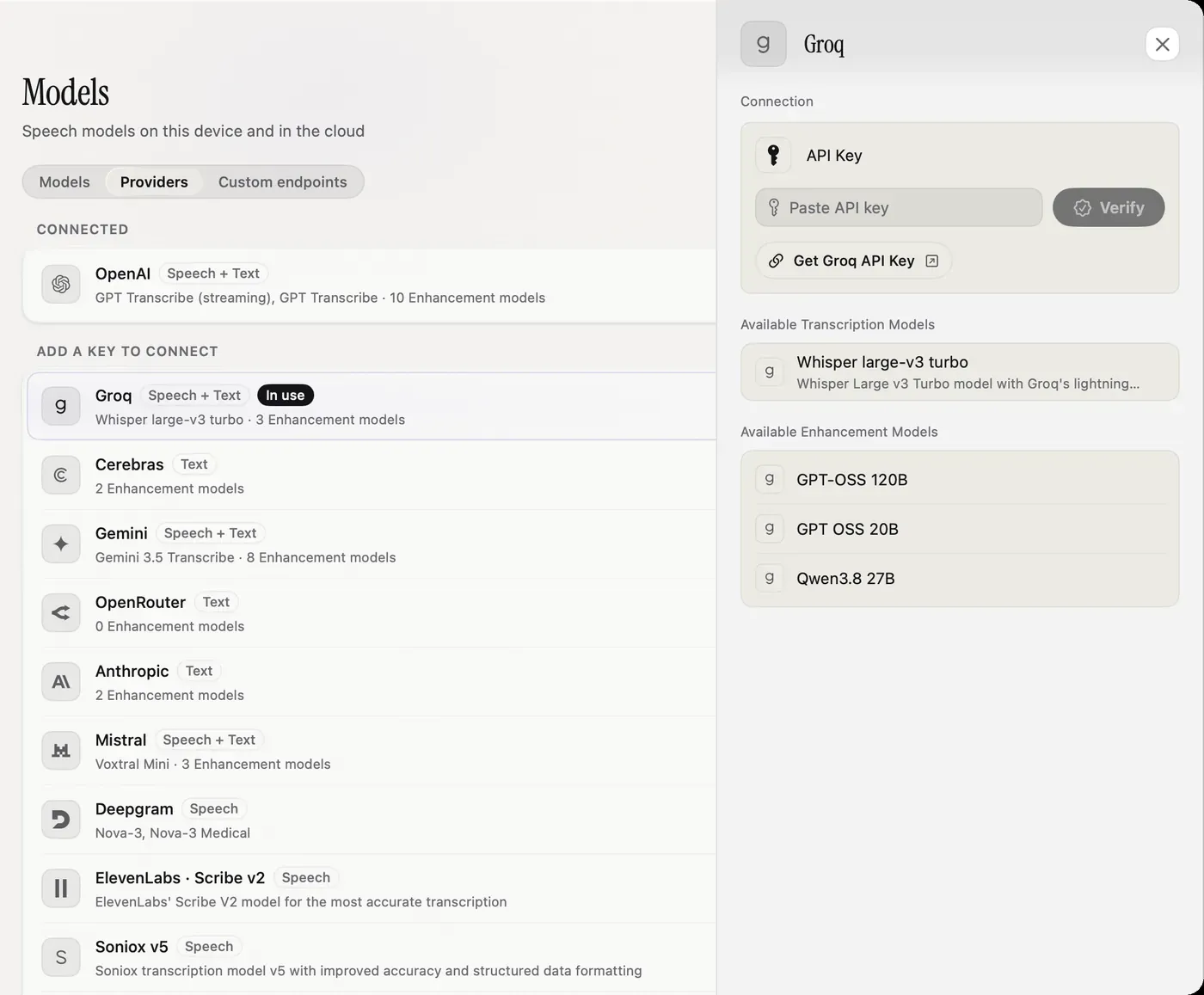
Using your own API key for dictation means the app sends your audio to the speech provider with a key from your account, and the provider bills you directly, usually cents per hour of speech. At list prices on 2026-09-27, 4 hours a month costs about $0.16 on Groq Whisper and $1.08 on GPT Transcribe. Keep the key in the macOS Keychain, set a spend limit, and use a separate key for each app.
What does BYO key mean?
Subscription dictation apps run the speech model on their own servers and charge a flat fee, $144 a year for Wispr Flow Pro as of 2026-09-27. You never see what a minute costs them.
With your own key, the app is the client and you are the customer of the provider: OpenAI, Deepgram, Groq, ElevenLabs and others. There is no middle server and no markup. Your audio goes from your Mac to that provider and nowhere else.
The trade: you create an account with the provider, and you look after the key.
Where does the key live?
That is the first safety question for any app that asks for a key.
In Nota, keys are stored in the macOS Keychain, the same encrypted store macOS uses for your passwords. The app shows only a masked version once it is saved. Each key is sent only to its own provider: the OpenAI key to OpenAI, the Groq key to Groq. There is no Nota server that sees your keys or your audio.
Adding one takes a minute: open Models > Providers, pick the provider, paste the key and press Verify. Nota checks the key with the provider before saving it. The Get API key link opens that provider’s console. The cloud models guide walks through each provider.
What will you pay?
List prices per minute from Nota’s catalogue, checked 2026-09-27, times 60. The provider’s pricing page is the final word, and prices change.
| Model | $/hour of speech | 4 hours a month |
|---|---|---|
| Mistral Voxtral | about $0.18 | about $0.72 |
| Groq Whisper Large v3 Turbo | about $0.04 | about $0.16 |
| Deepgram Nova-3 | about $0.26 | about $1.04 |
| GPT Transcribe (OpenAI) | about $0.27 | about $1.08 |
| ElevenLabs Scribe v2 | about $0.22 | about $0.88 |
| Any local model | $0 | $0 |
If you also use the optional cleanup pass, it adds under a cent per hour of speech on the default model. Nota shows this month’s spend per provider on its Home screen, split into speech-to-text and cleanup, so the bill is never a surprise. OpenAI’s own pricing and API key docs have the current numbers and limits.
Safety checklist
- One key per app. Create a key just for your dictation app. If you stop using the app, delete that key and nothing else breaks.
- Set a spend limit. Most provider consoles let you set a monthly budget or usage limit. Set one well above your normal use and well below a painful number.
- Limit what the key can do where the provider allows it, for example a project key with access only to the models you need.
- Check where the key is stored. Keychain or equivalent, never a plain settings file you could sync or share by accident.
- Know how to revoke it. Revoking in the provider console stops the key at once, everywhere. In Nota, the small × next to the masked key removes it from your Mac.
- Watch the spend. A sudden jump means something is wrong. Revoke the key, then check what used it.
You may not need a key
Nota doesn’t need a key to work. It starts on Parakeet V3, a 494 MB local model that runs on your Mac with no internet and no bill. Whisper, Apple Speech and other local models are there too. Keys only matter when you want a specific cloud model.
Nota costs $79 once for one Mac ($59 early bird until December 31, 2026), the first 5,000 words are free, and what the models cost is between you and the provider. See the privacy page for every connection the app makes, and the models guide to compare local and cloud options.
Questions
Is it safe to put my API key in a dictation app?
It is as safe as the app's storage and where it sends the key. Nota keeps keys in the macOS Keychain and sends each one only to its provider.
How much will I pay the provider?
About $0.16 to $1.08 for 4 hours of speech a month at 2026-09-27 list prices, depending on the model.
Do I need an API key to use Nota?
No. Nota starts on a local model with no key. Keys are only for cloud models.
Nota is dictation for Mac: hold a key, talk, and it types. It is almost ready: get notified on release day, and the first 5,000 words will be free.