Docs Using Nota
Local models
Speech models that run on your Mac: on-device engines and cloud providers, free, private and offline-capable.
Local models turn speech into text on your Mac. They cost nothing, need no account, and keep working with no internet. Open Models in the sidebar to see them all.
Choose your languages
Pick the languages you dictate in, in any combination, and say whether you mix them in one sentence. Nota recommends a speech model that understands all of them and sets up a dictation mode for each language. You can change the choice any time in Settings › General.
Pick a model with the guide
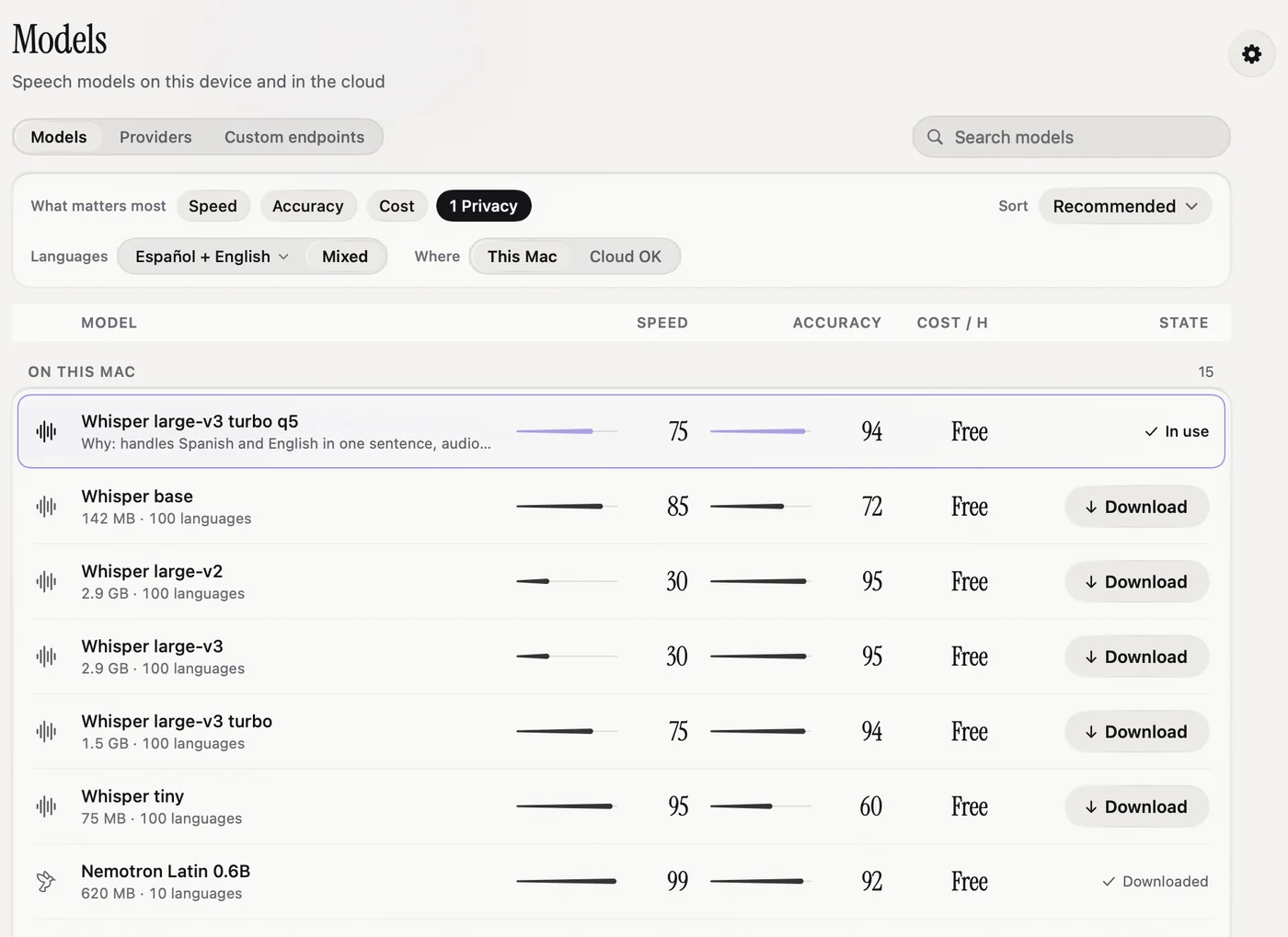
- Under What matters most, choose Speed, Accuracy, Cost or Privacy. You can pick more than one. The number shows the order you picked them in.
- Nota already knows your languages: the ones you picked in the language picker (see below). The recommendation is a model that understands all of them.
- Under Where, choose This Mac for local models only, or Cloud OK.
- The top row gets a Recommended badge and a short reason. Click Download.
- When the download is done, choose the model in your mode. The row in use shows In use.
The local models
| Model | Download | Languages | Good for |
|---|---|---|---|
| Parakeet V3 | 494 MB | 25 | The starter model. Fast and accurate for European languages. |
| Whisper base | 142 MB | 100 | Small and quick. A good first choice for English. |
| Whisper large-v3 turbo q5 | 547 MB | 100 | Near the best Whisper accuracy at a third of the size. |
| Whisper large-v3 turbo | 1.5 GB | 100 | High accuracy, reasonable speed. |
| Whisper large-v3, large-v2 | 2.9 GB | 100 | Highest Whisper accuracy. Slower. |
| Nemotron Latin 0.6B | 620 MB | 6 | Very fast. Listens while you talk. |
| Cohere Transcribe | 1.6 GB | 14 | High accuracy in its languages. |
You will also find smaller Whisper models, English-only versions, and other Parakeet versions. Sizes on the Models page are always current.
Apple Speech
Apple's own on-device speech model. It needs macOS 26 or later. The first time you use a language, macOS downloads it. Nota shows Download required until it is ready.
Manage downloads
- A download shows progress and can be cancelled.
- To free space, delete a model from its row. If a mode used it, choose another model for that mode.
- You can also import your own Whisper model file.
Speed and memory
A local model is loaded when you dictate and released afterwards, so it does not hold memory while you work. With Prewarm model on (in Model settings), Nota also loads your model a few seconds after it starts and after your Mac wakes, so the first dictation is fast.
Model settings
The gear button at the top of the Models page opens Model Settings. They apply to all models.
- Mixed Dictation: for people who speak one language and drop in English words. Turn on Keep English words in Latin script and edit the list of English words you use, so they are not spelled in the other alphabet.
- Whisper Prompt: a short hint text per language that steers Whisper models. Your dictionary words are added to it.
- Remove Filler Words: drops "uh", "um", "hmm" and similar. Remove a word with ×, or type one in Add a filler word.
- Voice Activity Detection (VAD): skips silence for local models.
- Prewarm model (Experimental): loads the model at launch and wake.
- Cloud timeout: how long to wait for a cloud transcription (30 seconds by default).
On an Intel Mac, local models are not reliable. The Models page shows a banner with a button to switch to the cloud. See Intel Macs.