Which Whisper model should your Mac run?
Whisper model sizes on a Mac as of 2026-09-27: tiny 75 MB to large-v3 2.9 GB. Which one to run for dictation, when turbo wins, and what quantized means.
Quantized model A quantized model stores its weights in fewer bits (q5 means about 5 bits per weight), so the file is smaller and needs less memory, with a small loss in accuracy.
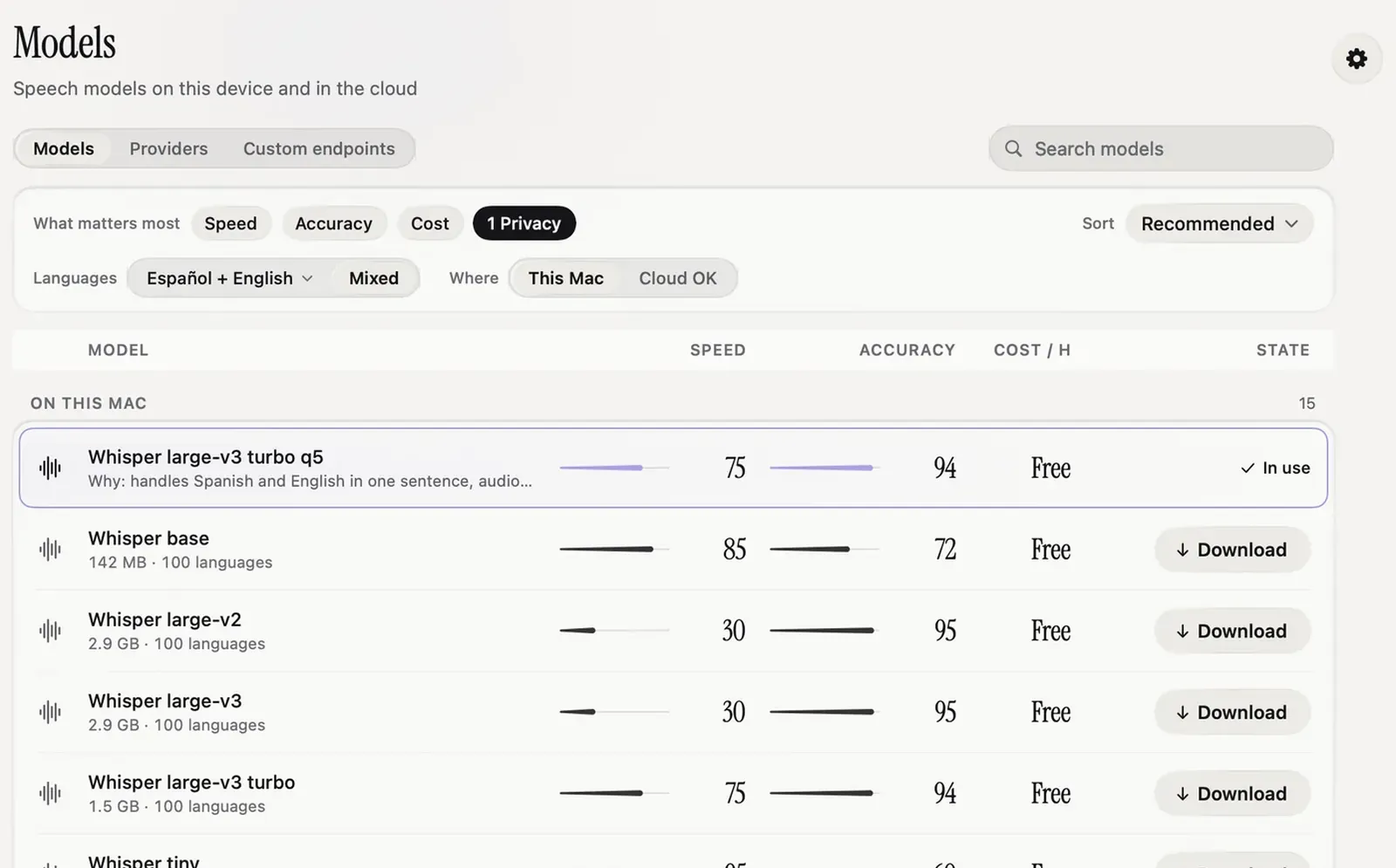
For most Macs, run Whisper large-v3 turbo: a 1.5 GB download, or 547 MB in its quantized q5 version, with accuracy close to the full model. Use base (142 MB) if you want the smallest file, and large-v3 (2.9 GB) only when you transcribe recorded files and can wait. Sizes are from Nota’s model list as of 2026-09-27. All of them run on the Mac with no internet and cost nothing per minute.
The Whisper family in Nota
Whisper is OpenAI’s open speech model, released in several sizes (github.com/openai/whisper). Nota offers these. Memory is Nota’s own estimate of what the model needs while it runs.
| Model | Download | Memory (GB, estimate) | Languages | Use when |
|---|---|---|---|---|
| tiny | 75 MB | 0.3 | about 99 | Testing only; too many errors for daily use |
| tiny.en | 75 MB | 0.3 | English | Old Macs with little memory |
| base | 142 MB | 0.5 | about 99 | Smallest usable model |
| base.en | 142 MB | 0.5 | English | Smallest usable model, English only |
| large-v3 turbo q5 | 547 MB | 1.0 | about 99 | Most Macs, especially with 8 GB |
| large-v3 turbo | 1.5 GB | 1.8 | about 99 | Most Macs with 16 GB or more |
| large-v2 | 2.9 GB | 3.8 | about 99 | Rarely; large-v3 replaced it |
| large-v3 | 2.9 GB | 3.9 | about 99 | Long recorded files, when time doesn’t matter |
OpenAI also publishes small and medium sizes (244 and 769 million parameters). Nota doesn’t list them. For a middle option between base and full turbo, use turbo q5: it keeps nearly all of turbo’s quality in a download closer to base’s.
How do you choose? Three questions
- What do you speak? English only: the .en models are an option at the small sizes. Anything else, or two languages mixed: a multilingual model.
- How much memory does your Mac have? With 8 GB, pick turbo q5 or base, so the model doesn’t fight your browser and design tools for memory. When memory runs short, macOS swaps to disk and everything slows down, dictation included. With 16 GB or more, full turbo is fine.
- Live dictation or files? For dictation you wait for every sentence, so a smaller, faster model feels better. For a recorded interview you transcribe once, large-v3 is worth the extra time.
Turbo vs large-v3
Turbo is large-v3 with the decoder cut from 32 layers to 4 (Hugging Face model card). The decoder is the part that writes the text, and it runs again for every word, so fewer layers means much less work per sentence. OpenAI describes the trade as a small loss in accuracy for a large gain in speed.
For dictation that trade is almost always right. We don’t publish speed numbers because they depend on the Mac, the audio and what else is running. As a rule, smaller is faster.
The q5 version of turbo goes one step further: the same model, stored at lower precision. It is about a third of the download and needs about half the memory.
Should you use the English-only models?
Only if you never dictate anything but English. OpenAI notes that the .en models do better on English than their multilingual twins, mostly at the tiny and base sizes. The difference shrinks as models get larger, which is why there is no large .en model.
If you mix languages in one sentence, as I do with English and Russian, stay on a multilingual model and set the language to auto.
Memory and battery
A bigger model uses more memory and more power per minute of audio. On a laptop on battery, that shows up. If you dictate all day unplugged, turbo q5 or base is the sensible choice.
The first run after a download takes longer. Nota prepares the model for your Mac (the row shows “Optimizing for this Mac”), and after that it starts normally.
Whisper is not the only local option. Nota’s default for new users is Parakeet V3, a 494 MB model for 25 European languages. It is smaller than turbo and a good pick if you only speak those languages; the models guide lists which languages each model covers.
How do you switch models in Nota?
- Open Models and set Where to This Mac.
- Set the Sort menu to Smallest, or pick what matters most (Speed, Accuracy, Cost, Privacy) and let it recommend one.
- Click Download on the model you want.
- Choose it in a mode. Each mode keeps its own model, so you can use turbo q5 for dictation and large-v3 for a file-transcription mode.
The models guide explains each column on that page.
Questions
What is the best Whisper model for dictation on a Mac?
Whisper large-v3 turbo for most Macs, or its 547 MB q5 version if memory is tight. Base (142 MB) is the smallest usable option.
What is the difference between large-v3 and large-v3 turbo?
Turbo has 4 decoder layers instead of 32, so it is smaller and faster with slightly lower accuracy, according to OpenAI's model card.
How big are Whisper models?
In Nota as of 2026-09-27: tiny 75 MB, base 142 MB, large-v3 turbo 1.5 GB (547 MB quantized), large-v2 and large-v3 2.9 GB each.
Nota is dictation for Mac: hold a key, talk, and it types. It is almost ready: get notified on release day, and the first 5,000 words will be free.