Offline dictation on a Mac: every option that works
Offline dictation on a Mac as of 2026-09-27: which apps run a local model, what they cost, a Wi-Fi-off test that proves it, and what still goes online.
Local (on-device) model A local model is a speech model stored and run on your Mac. The audio is turned into text on the machine, so it works with no internet and nothing is sent anywhere.
Yes, you can dictate on a Mac with no internet. Use Apple Dictation on Apple silicon (for the languages it runs on-device), or an app that runs a local speech model such as Parakeet or Whisper. Several do, from free (Handy, Spokenly) to $249.99 (Superwhisper lifetime), as of 2026-09-27. To prove your setup is offline, turn Wi-Fi off and dictate. If text appears, it is.
What makes dictation offline?
One thing: where the speech model runs. If the model is on your Mac, the audio is turned into text on your Mac. If the model is in the cloud, your audio goes to a server, and with no connection nothing comes back.
Speed is a separate question. A local model uses your Mac’s own chip, so a large model on an older Mac can feel slower than a cloud service. Pick a model size that fits the machine (more on that below).
“Private” and “offline” are not the same claim. Some cloud apps promise not to store or train on your audio. That can be true, but your voice still leaves the machine. Offline means it can’t.
Which Mac dictation apps work offline? (as of 2026-09-27)
| App | Works offline | Local models | Price |
|---|---|---|---|
| Apple Dictation | Supported languages on Apple silicon | Apple’s own | $0 |
| Handy | Yes, local only | Local models only | $0, open source |
| Spokenly | Yes, in local mode | Free local models | $0 local, Pro $99.99/yr |
| MacWhisper | Yes | Whisper and others | about €64 once |
| Nota | Yes, with a local model | Parakeet, Whisper, Apple Speech, Cohere Transcribe, SenseVoice | $79 once ($59 early bird until December 31, 2026) |
| Voibe | Yes, on Apple silicon | On-device open models | $149 lifetime or $7.50/mo yearly |
| Superwhisper | Yes | Whisper and others | $249.99 lifetime or $84.99/yr |
Sources: Apple Support, handy.computer, spokenly.app, macwhisper.com, saynota.com/pricing, getvoibe.com, superwhisper.com. Wispr Flow, Willow, Typeless and Aqua are cloud-only and don’t work offline.
How do you test it? Turn Wi-Fi off
This takes 30 seconds and settles the question for your setup, whatever an app’s website says.
- Pick the model or mode you normally use.
- Turn Wi-Fi off in Control Center, and unplug Ethernet if you use it.
- Open TextEdit and dictate two sentences.
- If the text appears, that setup is offline. If you get an error or nothing, it was using the cloud.
Do it once for each mode you use. In apps with several modes, one can be local and another cloud, and the test only covers the one you tried. For a stricter check, a network monitor such as LuLu shows every connection an app tries to make.
Which local model should you pick?
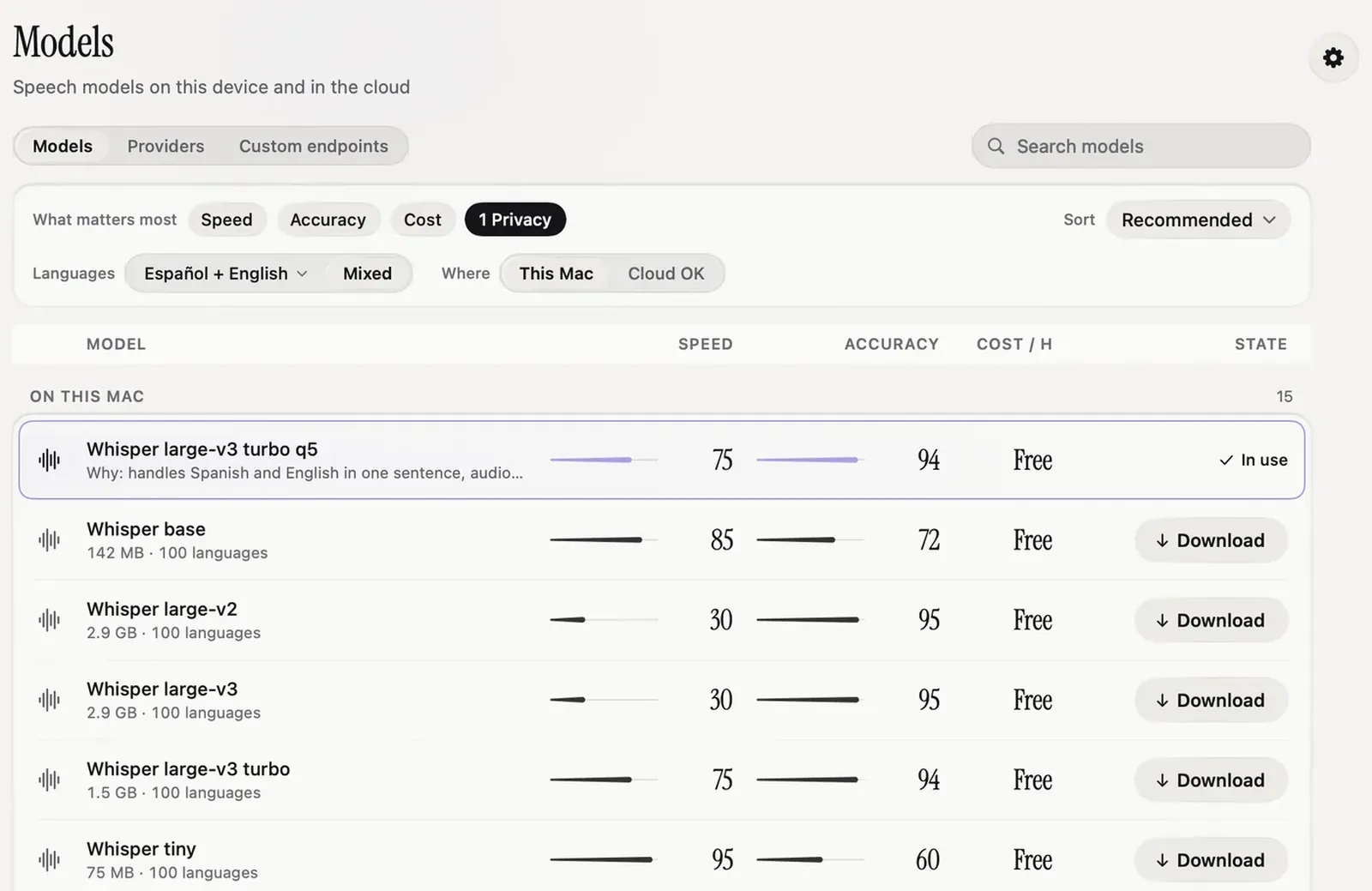
In Nota, the model guide filters by where the model runs: set Where to This Mac and only local models are listed, each marked Free in the cost column.
- Parakeet V3 (494 MB) is the default for new users. It covers 25 European languages, including English, German, French, Spanish, Russian and Ukrainian.
- Whisper large-v3 turbo (1.5 GB, or 547 MB quantized) covers about 99 languages. Use it for anything Parakeet doesn’t cover. The Whisper sizes post goes through every size.
- SenseVoice Small (241 MB) for Chinese, Cantonese, Japanese and Korean.
- Apple Speech is built into macOS 26 and needs no download.
Every local model costs $0 per minute to run. If you dictate in more than one language, choose a model that covers all of them and set the language to auto, rather than switching models every time.
What still goes online?
Being precise here matters more than a clean slogan.
With a local model, dictation itself never needs the network. Some other things do:
- Model downloads. The model has to reach your Mac once. After that it stays.
- Licence activation. Nota checks the licence once when you activate it, then works offline indefinitely.
- Update checks. Checking for a new version contacts the update server. Nothing about your dictation is sent with it.
- The cleanup pass. Smart Dictation and rewriting styles call the provider you picked. On a cloud provider that needs the internet, so turn Smart Dictation off for fully offline work, or point it at a local Ollama model.
- Auto Learn review. Learning from your corrections uses the provider you configured. Set review to manual if you don’t want it to run on its own.
The first 5,000 words in Nota are free with no account, so you can run the Wi-Fi-off test before you pay. The privacy page lists every connection the app makes, and Download has the current version.
Questions
Can I dictate on a Mac without internet?
Yes. Apple Dictation on Apple silicon works offline for supported languages, and apps with local models work with no internet at all.
Which dictation apps work fully offline?
Apps that run local models, such as Superwhisper, MacWhisper, Handy, Spokenly, Voibe and Nota, as of 2026-09-27.
Does Nota need the internet?
Not for dictation with a local model. Licence activation, update checks and model downloads use the network, and so do cloud models and the cleanup pass on a cloud provider.
Nota is dictation for Mac: hold a key, talk, and it types. It is almost ready: get notified on release day, and the first 5,000 words will be free.