How to add custom words to dictation on a Mac
Apple Dictation has no custom word list. The Voice Control vocabulary, the Contacts workaround, and how a real dictation dictionary works (2026-09-27).
Vocabulary hint A vocabulary hint is a word passed to the speech model before it transcribes, so it prefers that spelling when it hears something close.
Apple Dictation has no custom word list, as of macOS 26 on 2026-09-27. You have three ways around it: the Voice Control vocabulary (System Settings > Accessibility > Voice Control > Vocabulary), adding names to Contacts, or a dictation app with its own dictionary. Only the last one works in every app while you dictate normally, and only it can replace a spoken phrase with fixed text.
How do you use the Voice Control vocabulary?
Voice Control is Apple’s full hands-free system, separate from Dictation. It has a vocabulary list (Apple Support).
- Open System Settings > Accessibility > Voice Control.
- Turn Voice Control on.
- Click Vocabulary, then the add button, and type the word or name.
- Dictate with Voice Control running.
The catch: the list only applies while Voice Control is on. Voice Control also listens for commands all the time, which many people find too much for normal typing.
Does the Contacts workaround work?
Often, for names. Apple Dictation tends to recognise names that are in your Contacts, a tip that comes up again and again on Apple’s forums. Add a contact with the name spelled the way you want it, and try again.
It works for people’s names. It is awkward for product names, jargon or a fantasy city, and it fills your Contacts with fake entries.
What are replacements and snippets?
A replacement is a rule: when you say this, write that. Say “my email”, get your full address. Say “sign off”, get your usual closing lines. It also fixes a word the model keeps getting wrong in the same way.
Apple Dictation has no replacements. A dictation app’s dictionary usually does.
| Method | Where | Works in |
|---|---|---|
| Voice Control vocabulary | Accessibility > Voice Control > Vocabulary | Only while Voice Control is on |
| Contacts | The Contacts app | Apple Dictation, mostly for people’s names |
| Dictation app dictionary | The app’s settings | Every app you dictate into with that app |
| Dictation app replacements | The app’s settings | Every app, as fixed text |
In Nota, the dictionary has both kinds of entry:
- Words are passed to the speech model as vocabulary hints, so it prefers “Figma” or your client’s name over a near miss. Hints help the model choose between spellings it half-hears; they can’t make it hear a word you didn’t say.
- Replacements swap a spoken phrase for your text. A replacement can list several spoken variants.
Replacements run last, after any cleanup or rewrite. If the rewrite changes a word, your replacement still wins.
Can a dictionary learn from your fixes?
Yes, in some apps. In Nota there are two ways.
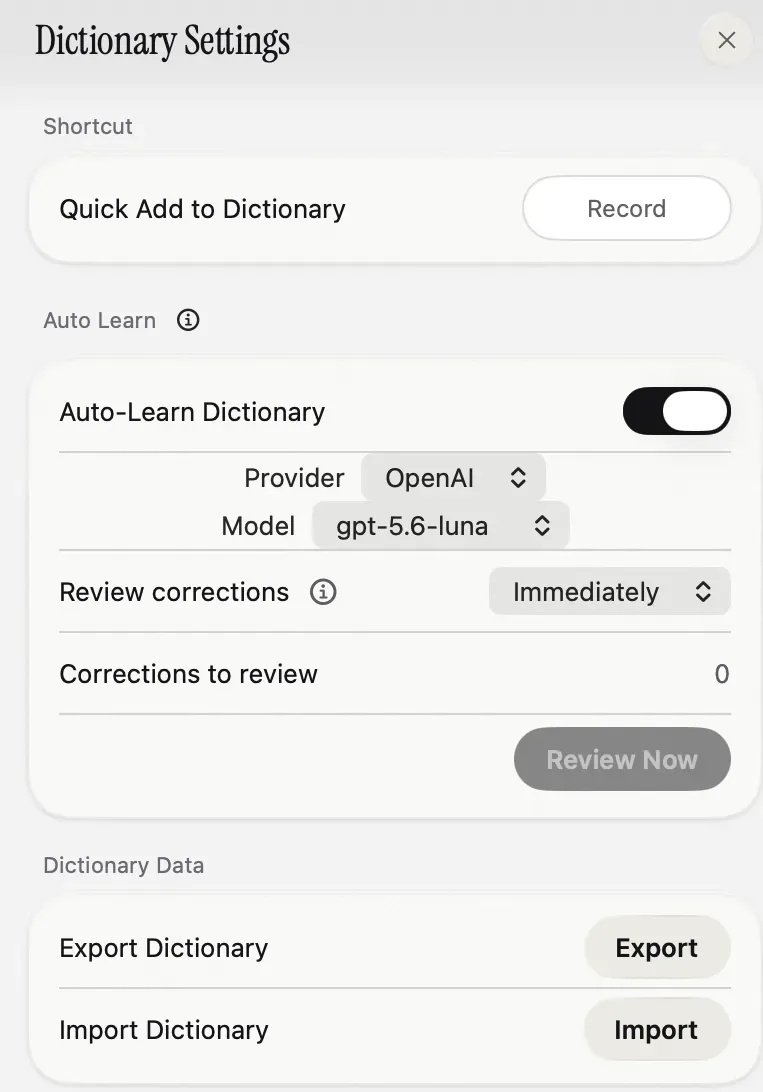
Auto Learn. After Nota pastes, it watches the text field for a short while. If you fix a word, it keeps the change as a candidate, then decides which fixes should become dictionary entries. That review uses the provider and model you set (the screenshot above), so it is not an offline feature. You can set review to manual and approve each change.
Edits in History. Edit a past transcript in History, and Nota offers to add the corrected name to the dictionary, or to add it as a replacement for the wrong word.
It also scans your last 30 days of dictation for names it keeps hearing and lists them as suggestions. And a Quick Add shortcut opens a small panel over any app, where you type a new word or replacement without opening the main window. It closes and puts you back where you were.
The first 5,000 words in Nota are free, which is plenty to build a dictionary and see if it holds up. The dictionary guide covers each entry type, and if Dictation isn’t responding at all, start with Mac dictation not working.
Questions
Can I add words to Mac dictation?
Not to Dictation itself. Voice Control has a custom vocabulary, and names in Contacts are often recognised.
How do I make dictation spell a name right?
Add it to Contacts for Apple Dictation, or add it to a dictation app's dictionary, which passes it to the speech model.
What is a dictation replacement?
A rule that swaps a spoken phrase for text, such as 'my email' for your full address, every time it appears.
Nota is dictation for Mac: hold a key, talk, and it types. It is almost ready: get notified on release day, and the first 5,000 words will be free.