Speaking vs typing speed: what the research says
People type about 52 words a minute and dictate about 153, per two published studies. What that measures, why editing narrows the gap, how to test yours.
WPM (words per minute) Words per minute is the number of words entered divided by the minutes it took. Typing studies usually count five characters, including spaces, as one word.
People type at about 52 words per minute on average, according to a 2018 study of 168,000 volunteers (Dhakal et al., CHI 2018). Speech input ran at about 153 words per minute in English in a Stanford-led study (Ruan et al., 2018), 2.9 times the keyboard rate measured there. Those figures are for copying set phrases. Once you count thinking and fixing errors, the real gap is smaller.
How fast people type (sourced)
One of the largest typing studies is Observations on Typing from 136 Million Keystrokes by Dhakal, Feit, Kristensson and Oulasvirta, presented at CHI 2018. 168,000 volunteers took an online typing test that asked them to copy English sentences.
The average was 51.56 words per minute, with a standard deviation of about 20 WPM. The spread is wide: a 30 WPM typist and a 90 WPM typist are both ordinary.
Two caveats matter:
- The volunteers chose to take a typing test, so they probably type more than average.
- They copied sentences shown on screen. Nobody had to decide what to say.
How fast people speak (sourced)
The clearest head-to-head comparison is Comparing Speech and Keyboard Text Entry for Short Messages in Two Languages on Touchscreen Phones by Ruan, Wobbrock, Liou, Ng and Landay. The preprint appeared in 2016; the paper was published in ACM Transactions on Computer-Human Interaction in 2018.
Participants entered the same short phrases by speech and by a phone keyboard. In English, speech averaged 152.86 WPM against 52.24 WPM on the keyboard, 2.93 times faster. Speech also needed fewer corrections along the way.
| Method | Average WPM | Source |
|---|---|---|
| Typing, computer keyboard, copying sentences | 51.56 | Dhakal et al., CHI 2018 (168,000 volunteers) |
| Typing, phone keyboard, English phrases | 52.24 | Ruan et al., 2018 |
| Speech input, English phrases | 152.86 | Ruan et al., 2018 |
Note what the table compares. The 52 WPM keyboard figure in Ruan’s study is a phone keyboard; the Dhakal figure comes from computer keyboards. They landed close together, which is a coincidence of the two setups, not a rule.
Vendor pages quote numbers like “4x faster” or “220 WPM” without a study behind them. Neither study above supports a figure that high for everyday use.
Where the gap shrinks: editing and corrections
Raw speed is not finished text. Three things eat into the speech advantage:
Errors left behind. In Ruan’s study, speech left slightly more errors in the final text: 0.55% against 0.35% for the keyboard in English. Fixing each one means reaching for the keyboard or mouse.
Thinking time. Both studies measured copying. When you compose an email, you pause to decide what to say. Those pauses are the same whether you type or talk, so they dilute the ratio. A 3x raw advantage becomes something smaller over a real message.
Formatting. Speech arrives as a stream. Punctuation, paragraphs, capital letters and “no, I meant Friday” all need handling. Done by hand, that is editing time. Done by a cleanup step (removing fillers, fixing punctuation, applying spoken corrections), it moves back toward the raw number.
A few habits keep more of the raw advantage:
- Think first, then talk. Decide the point of the message, then say it in one go. Stopping mid-sentence to think is where dictated text gets messy.
- Do not speak punctuation if a cleanup step adds it. Saying “comma” and “new paragraph” slows you down and is easy to get wrong.
- Draft by voice, edit by keyboard. Dictate the whole first draft, then fix details with the keyboard. Switching back and forth for every word costs more than either method alone.
- Correct out loud. If your tool handles spoken corrections, “no, Thursday” is faster than finding the word and retyping it.
Where dictation clearly wins: long first drafts, messages where tone matters more than exact wording, and prompts to a coding assistant, where more context usually means a better answer. Where it loses: short edits inside existing text, code itself, and anything in an open-plan office.
Measure your own numbers
Averages say little about you. Measure instead.
- Typing: take any online typing test three times and average it. Then time yourself writing a real email, not a test sentence.
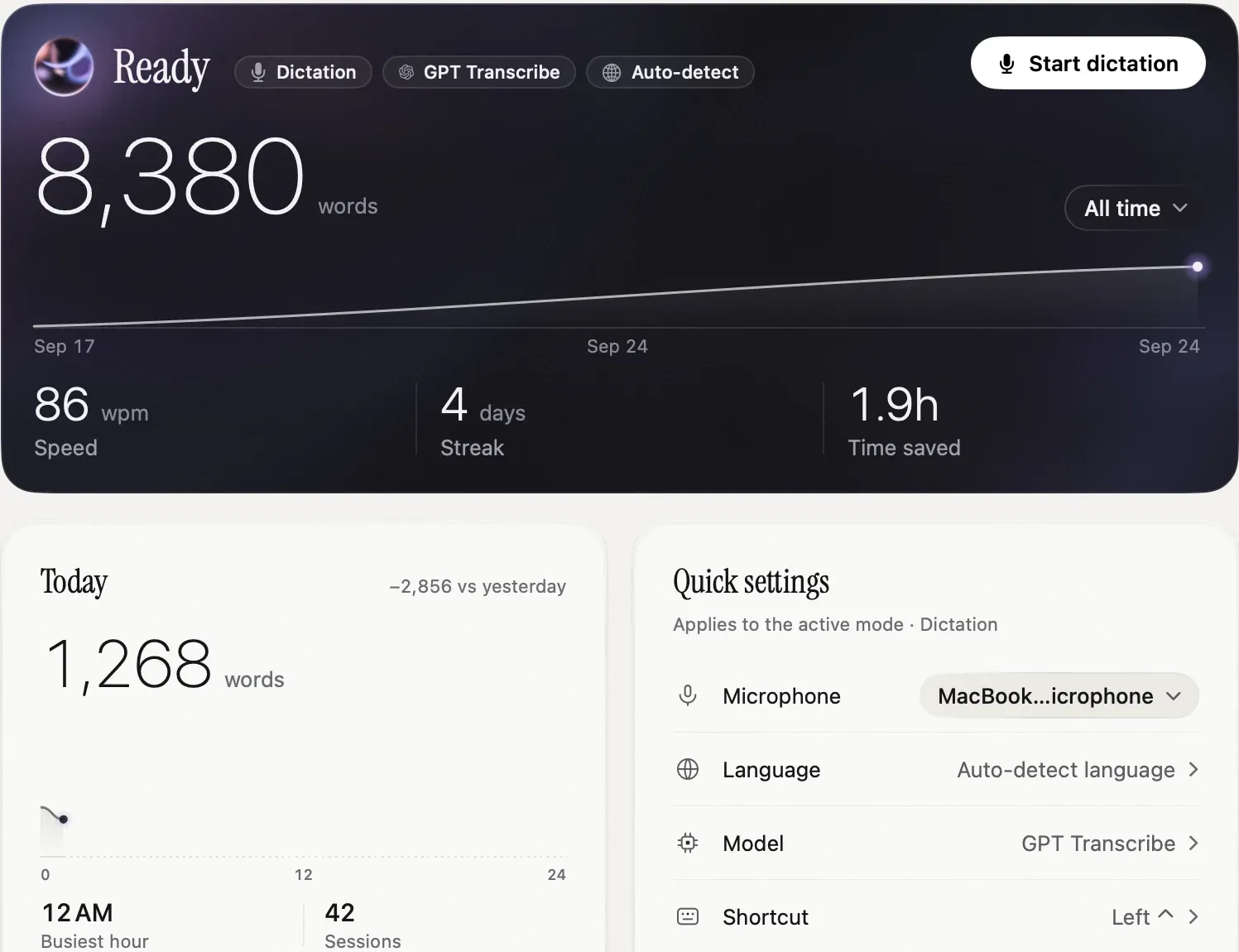
- Dictation: Nota’s Home shows your speed in WPM for the chosen period, computed as words divided by the minutes you actually spoke. The screenshot above is our own: 86 WPM across 8,380 words in about a week of testing, well under the 153 WPM lab figure, because real dictation includes thinking out loud.
Compare the two over a normal week of work, not a single day. One day of short Slack replies and one day of long briefs give very different numbers for both methods.
One honest note on Nota’s “Time saved” figure: it assumes you would otherwise type at 40 WPM. If you type faster, your real saving is smaller.
Home, History and the stats are described in the History docs. Nota is at /download.
Sources
- Dhakal, V., Feit, A. M., Kristensson, P. O., Oulasvirta, A. Observations on Typing from 136 Million Keystrokes. CHI 2018. Checked 2026-09-27.
- Ruan, S., Wobbrock, J. O., Liou, K., Ng, A., Landay, J. A. Comparing Speech and Keyboard Text Entry for Short Messages in Two Languages on Touchscreen Phones. ACM TOCHI, 2018; preprint 2016. Checked 2026-09-27.
Questions
How fast do people type?
About 52 words per minute on average, in a 2018 study of 168,000 volunteers (Dhakal et al., CHI 2018).
How fast do people speak?
In a Stanford-led study, people entering English text by speech averaged about 153 words per minute (Ruan et al., 2018).
Is dictation faster than typing?
For raw input, yes: the same study found speech about 2.9 times faster than a phone keyboard in English. Fixing errors and composing your thoughts narrow the gap.
Nota is dictation for Mac: hold a key, talk, and it types. It is almost ready: get notified on release day, and the first 5,000 words will be free.