Dictating in two languages in one sentence on a Mac
Apple Dictation listens in one language at a time. How to dictate mixed English and Russian in one sentence on a Mac, with results from our EN/RU test set.
Code-switching is changing language inside one sentence, for example a Russian sentence with English product words in it.
Apple Dictation can’t switch languages inside one sentence: as of 2026-09-27 it listens in the one language you picked. To dictate mixed English and Russian (or any pair), use a multilingual speech model such as Whisper with the language set to auto-detect, then a cleanup step told to keep each word in the language you spoke. In our 12-case EN/RU test, Nota’s default cleanup model got all 12 right.
Why built-in dictation fails mid-sentence
Apple Dictation is set to one language at a time. You can add several in Keyboard settings and switch between them with the Globe key, but each dictation is transcribed as that one language.
So “Запусти deploy в staging” comes out with “deploy” and “staging” forced into Russian sound-alikes, or the whole sentence forced into English. The model is not wrong, it was told to expect one language.
I dictate in English and Russian every day, mostly Russian sentences with English tool names in them. That is the normal case for a lot of people who work in tech, and it is the case single-language dictation handles worst.
Which models handle code-switching
Auto-detect means the model decides the language from the audio instead of being told.
What helps:
- A multilingual model with auto-detect. Whisper (about 99 languages) and the larger cloud models (GPT Transcribe, ElevenLabs Scribe, Deepgram Nova-3) are trained on many languages and do not need to be told which one is coming. Deepgram calls its setting
multi. - A model that covers both of your languages. Parakeet V3 covers 25 European languages, including Russian and English. Nemotron Latin covers 6, none of them Russian. Check the list before you pick.
- A cleanup pass that does not translate. If the text goes through a language model afterwards, its instructions must say “keep mixed-language text as spoken”. Many rewrite prompts quietly translate everything into one language.
Results depend on the language pair and on your accent. Nobody’s benchmark tells you how your own sentences come out, so test with five of your real ones.
Our EN/RU test: 3 examples
When we picked the default model for Smart Dictation, we ran a 12-case test set of English, Russian and mixed input through each candidate model. The input is a raw transcript, the check is exact match with an accepted answer. gpt-5.6-luna passed 12 of 12 on two runs (2026-09-26). The other models we tried scored lower on the same set.
Three of the cases, as text in and text out:
| Transcript in | What should come out | gpt-5.6-luna, 2026-09-26 |
|---|---|---|
| Запусти deploy в staging, нет, в production после review. | Запусти deploy в production после review. | Passed: English words kept, correction applied |
| Встреча в четверг, нет, в пятницу в 11:30. | Встреча в пятницу в 11:30. | Passed |
| привет как дела ты придёшь завтра на встречу | Привет, как дела? Ты придёшь завтра на встречу? | Passed: capitals and question marks added |
This is our own test, it is small, and it checks the cleanup step, not the speech model. It does show the part that usually breaks: the English words stay English, and “нет, в production” is read as a correction, not as text.
Set a mixed-language mode
In Nota:
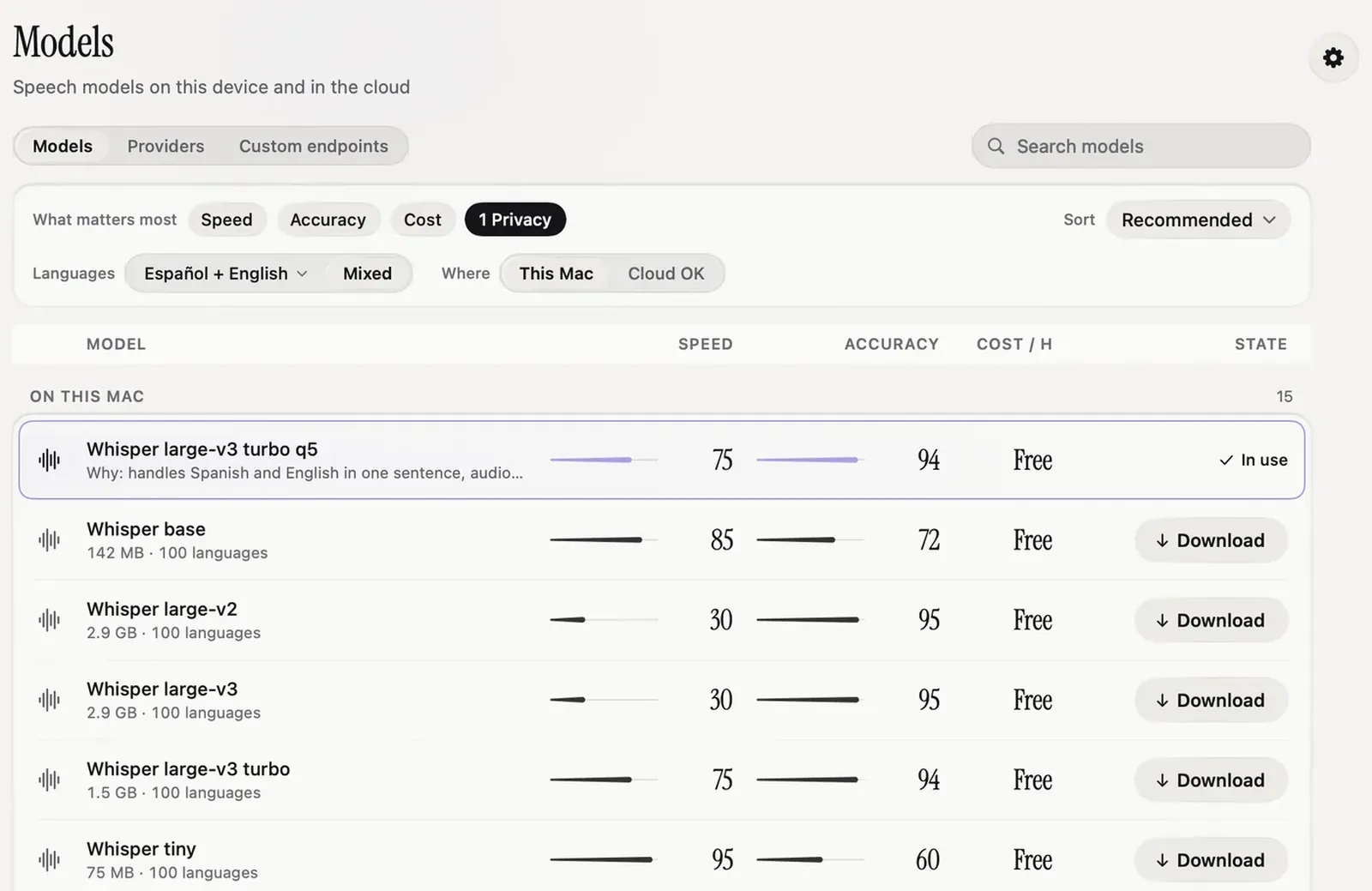
- Open Models. The Languages chip in the guide strip shows the languages you picked in setup (change them in Settings › General). Turn on Mixed and the list keeps models that cover all of them, here English and Russian, ranked by what you picked under What matters most.
- Open Modes, pick your dictation mode and set its language to Auto-detect. A fixed language forces the model into that language.
- Optional: turn on Smart Dictation in Settings. It fixes punctuation and handles spoken corrections in both languages. It needs a provider key (OpenAI by default), and it costs about a cent an hour of speech for the cleanup step.
The models docs cover the guide strip, and Smart Dictation covers the styles.
Names and terms in two scripts
Names are where mixed dictation still slips: a colleague’s name in Cyrillic, a product name in Latin, a brand that exists in both.
Add them to the dictionary in the script you want them written in. Nota passes dictionary words as hints to speech models that accept them (Whisper and most cloud models; Parakeet does not), and replacements run after every dictation on any model, so “кубернетис” can always land as “Kubernetes”. If you correct a word right after it lands, Auto Learn offers to add the fix; its review step uses the AI provider you set.
The model guide is on the Models docs page.
Questions
Can Mac dictation switch languages mid-sentence?
No. Apple Dictation uses one language at a time, and you switch it by hand between dictations.
Which speech models handle mixed languages?
Multilingual models such as Whisper detect the language automatically. Results vary by language pair, so test with your own sentences.
Does Nota support mixed English and Russian?
Yes. The model guide has a Mixed option, and the default Smart Dictation model passed all 12 cases of our EN/RU test set (2026-09-26).
Nota is dictation for Mac: hold a key, talk, and it types. It is almost ready: get notified on release day, and the first 5,000 words will be free.