How to remove 'um' and 'uh' from dictated text
Three ways to remove um, uh and self-corrections from dictated text, and what a cleanup pass costs per hour of speech as of 2026-09-27. Keep the original.
Self-correction A self-correction is when you fix yourself mid-sentence, as in 'Thursday, no, Friday'. A cleanup pass keeps the correction and drops the mistake.
To remove “um”, “uh” and self-corrections from dictated text, run a cleanup pass after transcription: a language model drops fillers and repeats and keeps only the corrected version of what you meant. In Nota that pass costs about a cent per hour of speech on the default model, on your own key, as of 2026-09-27. Speech-to-text is billed separately. For plain fillers, a free word list is often enough.
Why do fillers appear?
The speech model writes down what it hears. Some models are trained to write every sound, so “um”, “uh” and “you know” land in your text. Others leave most fillers out on their own. Deepgram, for example, drops them unless you ask it to keep them (Deepgram docs).
Fillers are the easy part. The hard part is the self-correction: “send it Thursday, no, Friday”. A model that writes exactly what you said gives you both days.
What are the three ways to remove them?
| Method | Removes fillers | Handles “no, Friday” | Cost |
|---|---|---|---|
| A model that drops fillers | Mostly | No | The model’s own price |
| A filler word list | Yes, the listed words | No | $0, runs on your Mac |
| A cleanup pass | Yes | Yes | About $0.01/hour in Nota (cleanup only) |
Option 1: a model that drops them
Pick a speech model that leaves fillers out. This costs nothing extra, but you can’t control it, and results differ from one recording to the next. It does nothing for self-corrections or repeated words.
Option 2: a filler word list
A simple rule removes listed words wherever they appear as whole words. Nota does this on every dictation, on your Mac, before anything else runs. The default list is uh, um, uhm, umm, uhh, uhhh, hmm, hm, mmm, mm, mh and ehh, and you can edit it. An empty list turns it off.
It is fast, free and predictable. It can’t tell a filler from a real word, which is why the list sticks to sounds that are never words, and it can’t fix “Thursday, no, Friday”.
Option 3: a cleanup pass, and what it costs
A cleanup pass sends the transcript to a language model with instructions: remove fillers and repeats, apply spoken corrections, fix punctuation, keep the meaning. In Nota this is Smart Dictation, with Spoken Corrections as its own switch.
Cost, at list prices on 2026-09-26:
- The cleanup pass on Nota’s default model: about a cent per hour of speech.
- Speech-to-text on GPT Transcribe, if you use the cloud: about $0.27 per hour. That is about 96% of the total.
- Speech-to-text on a local model: $0.
So the cleanup is the cheap part. Nota also skips the call for short, already-clean dictations (under 12 words, one sentence, no filler or correction words), which costs nothing at all. Home shows what you actually spent, split by provider.
The pass does need a provider. On a cloud provider it needs the internet, and your text goes to that provider on your key.
Keep the original
A cleanup pass can get it wrong: drop a word you meant, or read a real “no” as a correction. So keep the original.
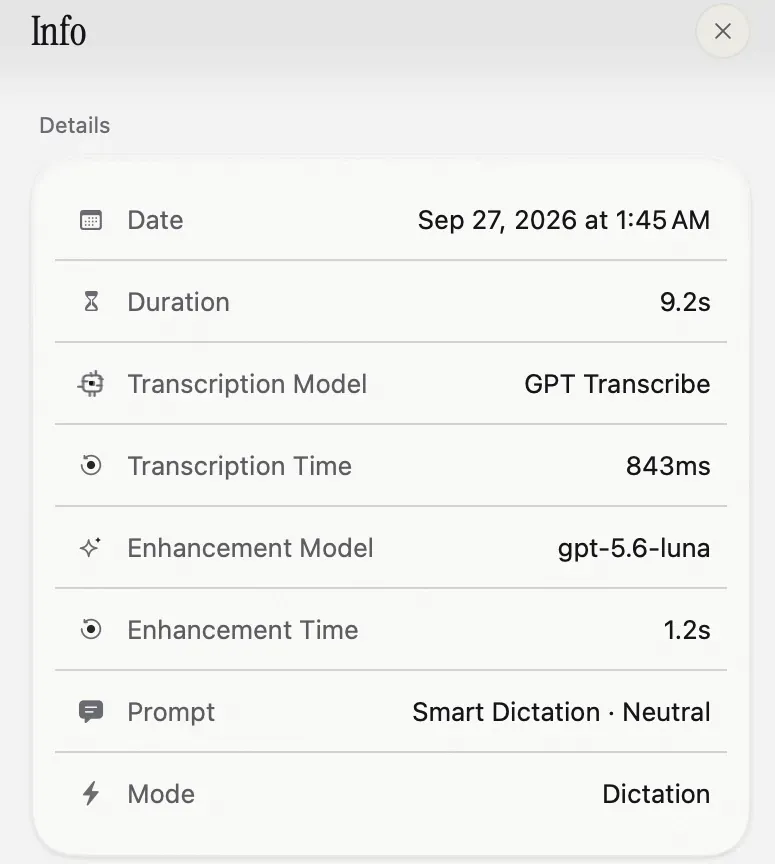
Nota’s History stores both versions of every dictation: Raw, what the speech model wrote, and Enhanced, what the cleanup produced. You can copy either one, and the Info panel (the screenshot above) shows which model did each step. If the cleanup keeps changing a word you want kept, add a replacement in the dictionary: replacements run after the cleanup, so they have the last word.
The first 5,000 words in Nota are free with no account, so you can compare raw and cleaned text on your own speech before paying.
Questions
Why does dictation type 'um'?
Some speech models transcribe every sound you make, including fillers. Others leave most of them out by default.
How do I stop fillers in dictated text?
Use an app that strips a filler list, or a cleanup pass after transcription, or a model that drops fillers by default.
How much does the cleanup cost?
In Nota, about a cent per hour of speech on the default cleanup model, on your own key. Speech-to-text is billed separately.
Nota is dictation for Mac: hold a key, talk, and it types. It is almost ready: get notified on release day, and the first 5,000 words will be free.