Docs Getting started
The recorder pill
The small capsule on screen that shows what Nota is doing right now: listening, transcribing or processing.
The pill appears the moment you press your shortcut and hides when the text is in place. It never takes the keyboard away from the app you are typing in. It shows on every desktop and over full-screen apps, and it stays dark in both light and dark mode.
What each state means




| State | What is happening |
|---|---|
| Starting | You pressed the shortcut. The microphone is opening. |
| Listening | Nota is recording. The light moves with your voice. |
| Paused | Recording is paused. Press the pause button again to go on. |
| Transcribing | Your speech is being turned into text. |
| Processing | The text is being cleaned up by the mode's rewrite or by Smart Dictation. |
| Tick | The text was pasted. The pill hides. |
If nothing was said, the pill hides and a short notice appears. If something went wrong, a notice explains what happened. If you cancel, you get an Undo button for 5 seconds.
Expanded controls
Click the pill once (without dragging) to expand it. Click again to make it small.

- Pause stops recording for a moment without ending the dictation.
- Stop ends the dictation and pastes the text.
- Cancel (×) throws the dictation away. Undo is offered.
- Collapse makes the pill small again.
To always start expanded, set Settings › Interface › Panel detail to Expanded.
Move the pill
The pill has four homes: Bottom (the default, above the Dock), Notch (top centre, around the camera), Left and Right (along the screen edges).
- Drag the pill. Four outlines show where it can go.
- Drop it near one of them. It snaps into place.
You can also choose the position in Settings › Interface › Recorder position.
When there is nowhere to paste
If no text field has focus (say, you are on the desktop), Nota copies the text and shows a small card instead.
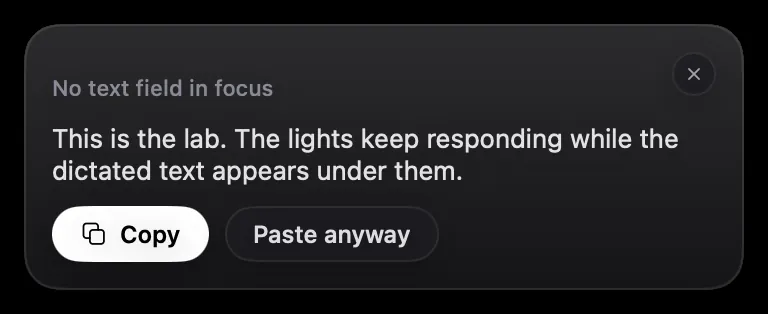
Copy copies it again. Paste anyway goes back to the last app and pastes there. The card closes by itself after 20 seconds, or press Esc.